I built a self-serve project management dashboard that let a company's leadership see 13 concurrent projects, drill into any milestone, and trace every task behind it — without asking anyone a question or waiting for a reply. It's built on Google Sheets and Looker Studio, not Notion or MS Project, and that was a deliberate call, not a compromise. What it looks like in practice is below.
The problem
At a group of companies running roughly a dozen projects at once — spanning IT infrastructure, compliance, procurement, and product launches — leadership had exactly one way to check status: ask the relevant department head, then wait. Multiply that across a dozen projects and a Board meeting, and "what's going on" becomes a slow, manual, person-dependent exercise. It isn't anyone's fault, and it's everyone's problem: the department head is doing real work, not sitting by the phone, and the Board is making decisions on whatever answer arrives fastest rather than whatever answer is most current.
Why Google Sheets and Looker Studio, not Notion or MS Project
The obvious tools for this — Notion, MS Project — weren't the right call here, and not for a lack of capability. The organization wasn't familiar with either, and rolling out an unfamiliar platform across multiple departments costs more in adoption friction than it saves in features. A tool nobody opens doesn't report anything. Google Sheets, on the other hand, was something everyone already knew how to open and edit without training.
The trade-off people assume comes with that choice — you get something simpler, but you lose rigor — isn't actually true if the methodology is applied correctly. A spreadsheet with the right relational structure behind it — Project → Milestone → Task, keyed and linked properly — carries the same PM discipline as a dedicated tool. The structure is the discipline; the interface is just whichever one people will actually use. What that structure buys on top of the discipline is something Notion and MS Project don't give as easily: a system every department could edit themselves, paired with a Looker Studio front end that's more customizable and more readable for a non-PM audience — a Board — than either tool's native reporting.
What it does
The dashboard works in three levels, each one a click deeper than the last.
Level 1 — Portfolio view. Every active project, its status, and its completion percentage, side by side. At a glance: what's in execution, what's closing out, what's paused and why it's waiting on a decision.
Level 2 — Project → Milestone → Month. Click any project and see every milestone it's made of, which month each one started, and where it stands. Take the Battery Procurement Program as an example: nine milestones tracing a real operational sequence — 1st Order Supplier Negotiation → 1st Order Purchase → Logistics Negotiation → Delivery Arrival → Units Testing, then the same cycle again for a second order. Each milestone carries its own completion percentage and timeline, so a director can see not just that a project is "in progress" but exactly which stage of which order it's stuck or moving on.
Level 3 — Milestone → Task. Click a milestone and see the individual tasks underneath it, each one timestamped and status-tagged. Under "1st Order Supplier Negotiation": Request Quotation, Request Teams to Assess Quotation, Negotiate & Request Management Approval, Check In-Stock Status — four tasks, each marked done, each dated. That's the level of granularity that used to require a phone call.
What it looks like
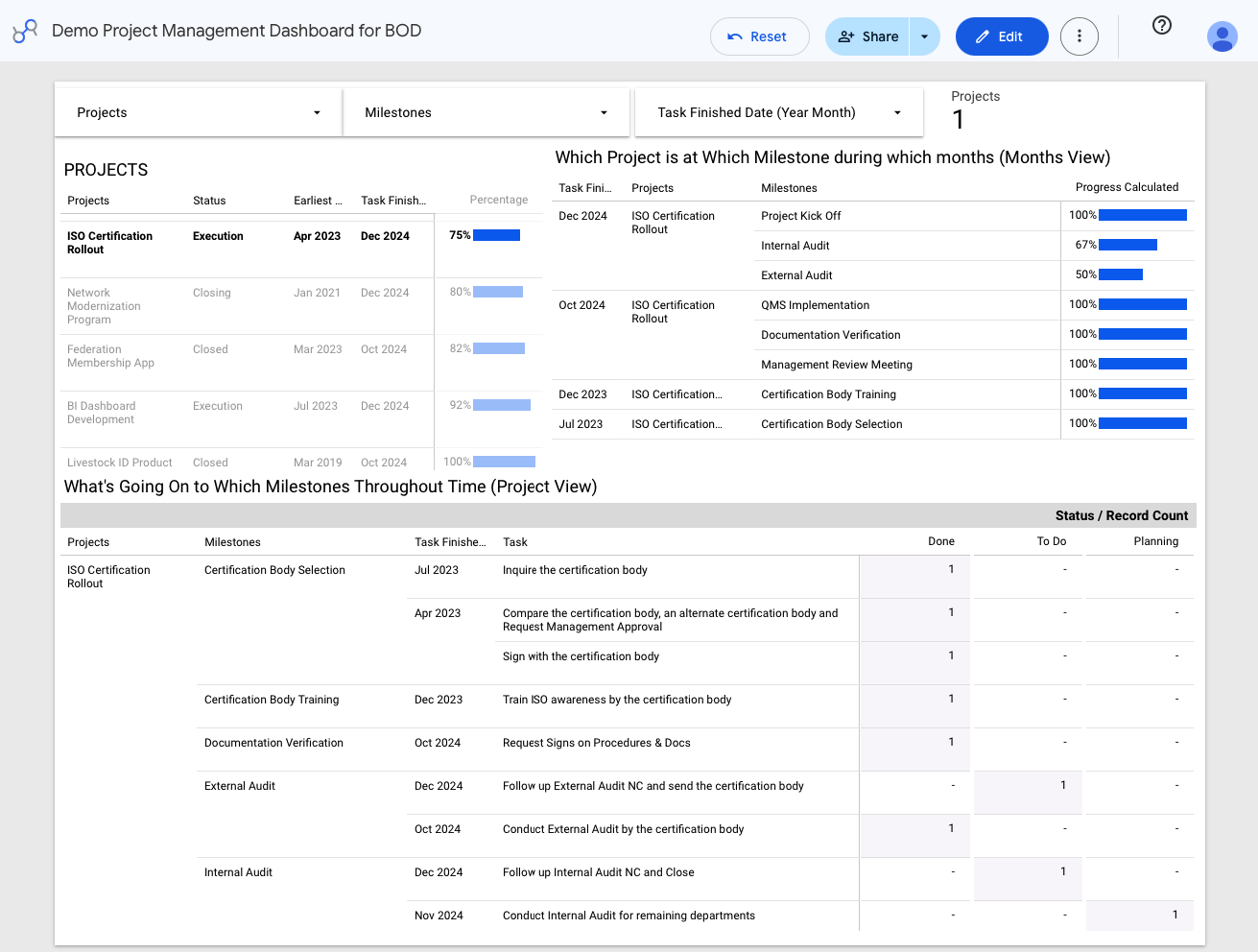
The same portfolio-to-milestone-to-task drill-down described above, as it renders in Looker Studio.
Why it matters
This is what a Project Management Office should be: not a status-reporting ritual, but a system that makes status a fact anyone can look up, not a favor someone has to give. Built for Waterfall, Agile, and Hybrid delivery alike, it turned every Board meeting's "where are we on X" into a question the dashboard had already answered.
The check: look at the task table above. Every row traces back through a named milestone to a named project, with a real date and a real status — Done, To Do, or Planning. That traceability, not the dashboard's polish, is the actual deliverable: a director should be able to find any task in three clicks, not three phone calls.